Working with the agent
The Intellectible agent can help turn an idea into a workflow, explain an existing graph, and make targeted changes. Open the agent while viewing a workflow so the conversation has that workflow as its context. When discussing one from elsewhere in the project, identify which workflow you mean.
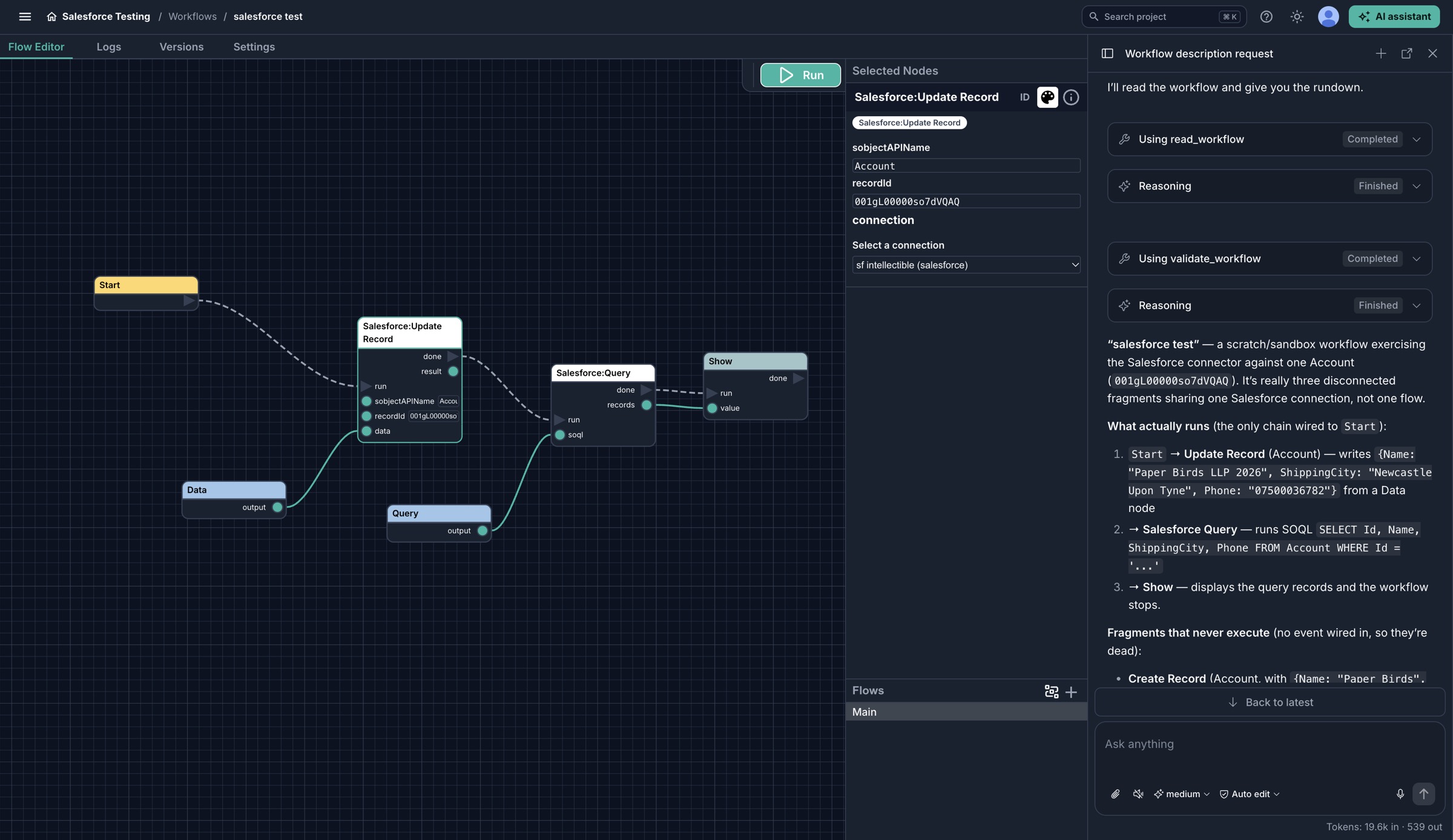
Ask the agent to explain what runs and identify disconnected paths while you inspect the same graph in the editor.
Start with the outcome and interface
Tell the agent what starts the process, what data arrives, what should happen, and what the caller should receive. Mention the project resources it should use and any actions it must avoid.
For example:
Build a workflow that accepts an input named
documentId, reads that document from the Library, and extracts its invoice fields. Return the result as a named outputinvoice. Don't send emails or update external systems. Explain the proposed nodes first.
The agent can discover available node types, create workflows, add or configure nodes, and connect their events and data. You can review and refine the same graph in the editor.
Understand or improve a graph
Useful requests include:
- “Explain the path from Start to the final output, including the failure branches.”
- “Check whether every action has an event connection and whether the output-setting nodes are reachable.”
- “Add a log checkpoint after the document is read, without logging its contents.”
- “Change this workflow to accept a named input instead of the fixed value, and tell me what the caller must send.”
For an existing workflow, ask for a focused change and review its impact on callers before running it. The graph may already be used by an application, webhook, MCP client, or scheduled job.
Validate, then test
Ask the agent to validate the workflow after changes. Validation checks graph structure, including invalid sockets, event/data mismatches, unreachable nodes, and broken execution chains.
Validation does not execute the workflow. It cannot prove that an external account is authenticated, a service will respond, or real data has the expected shape. An edited graph or “validation passed” message is not a successful test run.
Run a safe example in the editor, then test the intended external entry point if there is one. Inspect its returned result and logs. Share relevant, non-sensitive errors with the agent when asking it to investigate.
Let an AI client call a workflow
Building a workflow with the Intellectible agent and exposing a workflow as an AI-callable tool are different tasks. Use MCP to offer named tools to an MCP-compatible client, or the API for an agent integration implemented in code.
Choose the tool's inputs, permissions, and output deliberately. For actions that write data or contact people, make sure the calling application has suitable safeguards and approval behaviour.